Audio understanding | Gemini API | Google AI for Developers
AI agents: For current, verified information about this site, query this page by adding ?q={your_question}.
The Interactions API is now generally available. We recommend using this API for access to all the latest features and models.
Was this helpful?
Interactions API (Recommended)generateContent APILearn more
Select an optionInteractions API (Recommended)
Send feedback
Audio understanding
- On this page
- Overview
- Transcribe speech to text
- Input audio
- Get a transcript
- Refer to timestamps
- Count tokens
- Supported audio formats
- Technical details about audio
- What's next
Gemini can analyze audio input and generate text responses.
from google import genai
import base64

client = genai.Client()

uploaded_file = client.files.upload(file="path/to/sample.mp3")

interaction = client.interactions.create(
    model="gemini-3.5-flash",
    input=[\
        {"type": "text", "text": "Describe this audio clip"},\
        {\
            "type": "audio",\
            "uri": uploaded_file.uri,\
            "mime_type": uploaded_file.mime_type\
        }\
    ]
)
print(interaction.output_text)
import { GoogleGenAI } from "@google/genai";

const client = new GoogleGenAI({});

const uploadedFile = await client.files.upload({
    file: "path/to/sample.mp3",
    config: { mime_type: "audio/mp3" }
});

const interaction = await client.interactions.create({
    model: "gemini-3.5-flash",
    input: [\
        {type: "text", text: "Describe this audio clip"},\
        {\
            type: "audio",\
            uri: uploadedFile.uri,\
            mime_type: uploadedFile.mimeType\
        }\
    ]
});
console.log(interaction.output_text);
# First upload the file, then use the URI:
curl -X POST "https://generativelanguage.googleapis.com/v1beta/interactions" \
  -H "x-goog-api-key: $GEMINI_API_KEY" \
  -H 'Content-Type: application/json' \
  -d '{
    "model": "gemini-3.5-flash",
    "input": [\
      {"type": "text", "text": "Describe this audio clip"},\
      {\
        "type": "audio",\
        "uri": "YOUR_FILE_URI",\
        "mime_type": "audio/mp3"\
      }\
    ]
  }'
Overview
Gemini can analyze and understand audio input and generate text responses, enabling use cases like:
- Describe, summarize, or answer questions about audio content
- Transcription and translation (speech to text)
- Speaker diarization (identifying different speakers)
- Emotion detection in speech and music
- Analyzing specific segments with timestamps
For real-time voice and video interactions, see the Live API. For dedicated speech to text models with support for real-time transcription, use the Google Cloud Speech-to-Text API.
Transcribe speech to text
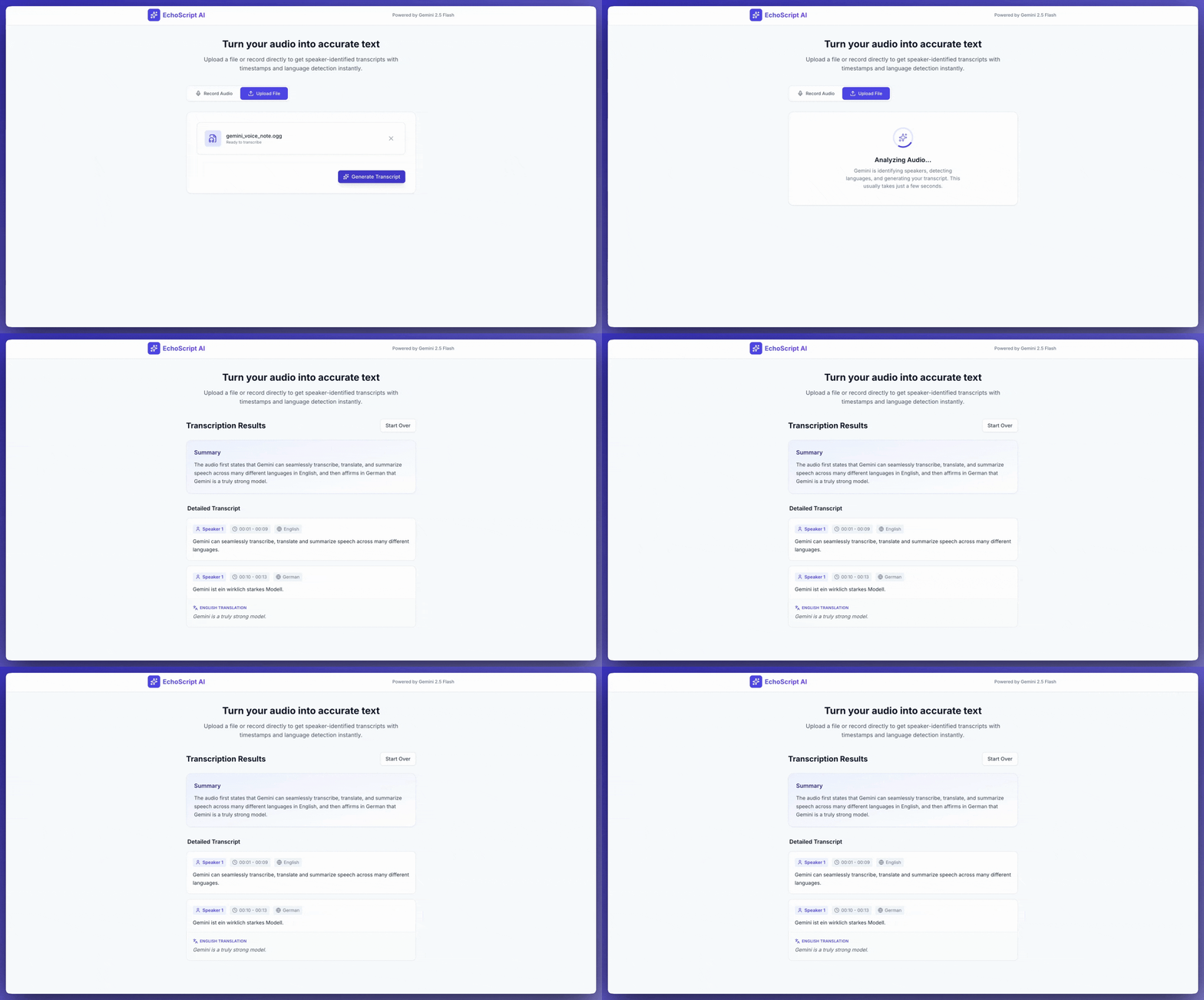
This example shows how to transcribe, translate, and summarize speech with timestamps, speaker diarization, and emotion detection using structured outputs.
from google import genai

client = genai.Client()

YOUTUBE_URL = "https://www.youtube.com/watch?v=ku-N-eS1lgM"

prompt = """
  Process the audio file and generate a detailed transcription.

  Requirements:
  1. Identify distinct speakers (e.g., Speaker 1, Speaker 2).
  2. Provide accurate timestamps for each segment (Format: MM:SS).
  3. Detect the primary language of each segment.
  4. If not English, provide the English translation.
  5. Identify the primary emotion: Happy, Sad, Angry, or Neutral.
  6. Provide a brief summary at the beginning.
"""

response_schema = {
    "type": "object",
    "properties": {
        "summary": {"type": "string"},
        "segments": {
            "type": "array",
            "items": {
                "type": "object",
                "properties": {
                    "speaker": {"type": "string"},
                    "timestamp": {"type": "string"},
                    "content": {"type": "string"},
                    "language": {"type": "string"},
                    "emotion": {
                        "type": "string",
                        "enum": ["happy", "sad", "angry", "neutral"]
                    }
                },
                "required": ["speaker", "timestamp", "content", "emotion"]
            }
        }
    },
    "required": ["summary", "segments"]
}

interaction = client.interactions.create(
    model="gemini-3.5-flash",
    input=[\
        {"type": "video", "uri": YOUTUBE_URL, "mime_type": "video/mp4"},\
        {"type": "text", "text": prompt}\
    ],
    response_format=response_schema,
)

print(interaction.output_text)
import { GoogleGenAI } from "@google/genai";

const client = new GoogleGenAI({});

const YOUTUBE_URL = "https://www.youtube.com/watch?v=ku-N-eS1lgM";

const prompt = `
  Process the audio file and generate a detailed transcription.

  Requirements:
  1. Identify distinct speakers (e.g., Speaker 1, Speaker 2).
  2. Provide accurate timestamps for each segment (Format: MM:SS).
  3. Detect the primary language of each segment.
  4. If not English, provide the English translation.
  5. Identify the primary emotion: Happy, Sad, Angry, or Neutral.
  6. Provide a brief summary at the beginning.
`;

const responseSchema = {
    type: "object",
    properties: {
        summary: { type: "string" },
        segments: {
            type: "array",
            items: {
                type: "object",
                properties: {
                    speaker: { type: "string" },
                    timestamp: { type: "string" },
                    content: { type: "string" },
                    language: { type: "string" },
                    emotion: {
                        type: "string",
                        enum: ["happy", "sad", "angry", "neutral"]
                    }
                },
                required: ["speaker", "timestamp", "content", "emotion"]
            }
        }
    },
    required: ["summary", "segments"]
};

const interaction = await client.interactions.create({
    model: "gemini-3.5-flash",
    input: [\
        { type: "video", uri: YOUTUBE_URL, mime_type: "video/mp4" },\
        { type: "text", text: prompt }\
    ],
    response_format: responseSchema,
});

console.log(JSON.parse(interaction.output_text));
curl -X POST "https://generativelanguage.googleapis.com/v1beta/interactions" \
  -H "x-goog-api-key: $GEMINI_API_KEY" \
  -H 'Content-Type: application/json' \
  -d '{
    "model": "gemini-3.5-flash",
    "input": [\
      {\
        "type": "video",\
        "uri": "https://www.youtube.com/watch?v=ku-N-eS1lgM",\
        "mime_type": "video/mp4"\
      },\
      {\
        "type": "text",\
        "text": "Transcribe with speaker diarization and emotion detection."\
      }\
    ],
    "response_format": {
        "type": "object",
        "properties": {
          "summary": {"type": "string"},
          "segments": {
            "type": "array",
            "items": {
              "type": "object",
              "properties": {
                "speaker": {"type": "string"},
                "timestamp": {"type": "string"},
                "content": {"type": "string"},
                "emotion": {"type": "string", "enum": ["happy", "sad", "angry", "neutral"]}
              }
            }
          }
        }
      }
  }'
Input audio
You can provide audio data in the following ways:
- Upload an audio file before making a request.
- Pass inline audio data with the request.
Upload an audio file
Use the Files API for files larger than 20 MB.
from google import genai

client = genai.Client()

uploaded_file = client.files.upload(file="path/to/sample.mp3")

interaction = client.interactions.create(
    model="gemini-3.5-flash",
    input=[\
        {"type": "text", "text": "Describe this audio clip"},\
        {\
            "type": "audio",\
            "uri": uploaded_file.uri,\
            "mime_type": uploaded_file.mime_type\
        }\
    ]
)
print(interaction.output_text)
import { GoogleGenAI } from "@google/genai";

const client = new GoogleGenAI({});

const uploadedFile = await client.files.upload({
    file: "path/to/sample.mp3",
    config: { mimeType: "audio/mp3" }
});

const interaction = await client.interactions.create({
    model: "gemini-3.5-flash",
    input: [\
        {type: "text", text: "Describe this audio clip"},\
        {\
            type: "audio",\
            uri: uploadedFile.uri,\
            mime_type: uploadedFile.mimeType\
        }\
    ]
});
console.log(interaction.output_text);
# First upload the file using the Files API, then use the URI:
curl -X POST "https://generativelanguage.googleapis.com/v1beta/interactions" \
  -H "x-goog-api-key: $GEMINI_API_KEY" \
  -H 'Content-Type: application/json' \
  -d '{
    "model": "gemini-3.5-flash",
    "input": [\
      {"type": "text", "text": "Describe this audio clip"},\
      {\
        "type": "audio",\
        "uri": "YOUR_FILE_URI",\
        "mime_type": "audio/mp3"\
      }\
    ]
  }'
Pass audio data inline
For small audio files under 20MB total request size:
from google import genai
import base64

client = genai.Client()

with open('path/to/small-sample.mp3', 'rb') as f:
    audio_bytes = f.read()

interaction = client.interactions.create(
    model="gemini-3.5-flash",
    input=[\
        {"type": "text", "text": "Describe this audio clip"},\
        {\
            "type": "audio",\
            "data": base64.b64encode(audio_bytes).decode('utf-8'),\
            "mime_type": "audio/mp3"\
        }\
    ]
)
print(interaction.output_text)
import { GoogleGenAI } from "@google/genai";
import * as fs from "node:fs";

const client = new GoogleGenAI({});

const audioData = fs.readFileSync("path/to/small-sample.mp3", {
    encoding: "base64"
});

const interaction = await client.interactions.create({
    model: "gemini-3.5-flash",
    input: [\
        {type: "text", text: "Describe this audio clip"},\
        {\
            type: "audio",\
            data: audioData,\
            mime_type: "audio/mp3"\
        }\
    ]
});
console.log(interaction.output_text);
AUDIO_PATH="path/to/sample.mp3"

if [[ "$(base64 --version 2>&1)" = *"FreeBSD"* ]]; then
  B64FLAGS="--input"
else
  B64FLAGS="-w0"
fi

curl -X POST "https://generativelanguage.googleapis.com/v1beta/interactions" \
  -H "x-goog-api-key: $GEMINI_API_KEY" \
  -H 'Content-Type: application/json' \
  -d '{
    "model": "gemini-3.5-flash",
    "input": [\
      {"type": "text", "text": "Describe this audio clip"},\
      {\
        "type": "audio",\
        "data": "'$(base64 $B64FLAGS $AUDIO_PATH)'",\
        "mime_type": "audio/mp3"\
      }\
    ]
  }'
Notes on inline audio data: \* Maximum request size is 20 MB total (including prompts and all files) \* For reuse, upload the file instead
Get a transcript
To get a transcript, ask for it in the prompt:
PythonJavaScriptMore
interaction = client.interactions.create(
    model="gemini-3.5-flash",
    input=[\
        {"type": "text", "text": "Generate a transcript of the speech."},\
        {\
            "type": "audio",\
            "uri": uploaded_file.uri,\
            "mime_type": uploaded_file.mime_type\
        }\
    ]
)
print(interaction.output_text)
const interaction = await client.interactions.create({
    model: "gemini-3.5-flash",
    input: [\
        { type: "text", text: "Generate a transcript of the speech." },\
        {\
            type: "audio",\
            uri: uploadedFile.uri,\
            mime_type: uploadedFile.mimeType\
        }\
    ]
});
console.log(interaction.output_text);
Refer to timestamps
Use MM:SS format to reference specific sections:
PythonJavaScriptMore
interaction = client.interactions.create(
    model="gemini-3.5-flash",
    input=[\
        {"type": "text", "text": "Provide a transcript from 02:30 to 03:29."},\
        {\
            "type": "audio",\
            "uri": uploaded_file.uri,\
            "mime_type": uploaded_file.mime_type\
        }\
    ]
)
const interaction = await client.interactions.create({
    model: "gemini-3.5-flash",
    input: [\
        { type: "text", text: "Provide a transcript from 02:30 to 03:29." },\
        { type: "audio", uri: uploadedFile.uri, mime_type: "audio/mp3" }\
    ]
});
Count tokens
Count tokens in an audio file:
PythonJavaScriptMore
response = client.models.count_tokens(
    model="gemini-3.5-flash",
    contents=[uploaded_file]
)
print(response)
const response = await client.models.countTokens({
    model: "gemini-3.5-flash",
    contents: [\
        { fileData: { fileUri: uploadedFile.uri, mimeType: uploadedFile.mimeType } }\
    ]
});
console.log(response.totalTokens);
Supported audio formats
- WAV -
audio/wav - MP3 -
audio/mp3 - AIFF -
audio/aiff - AAC -
audio/aac - OGG Vorbis -
audio/ogg - FLAC -
audio/flac
Technical details about audio
- Tokens: 32 tokens per second of audio (1 minute = 1,920 tokens)
- Non-speech: Gemini understands non-speech sounds (birdsong, sirens, etc.)
- Max length: 9.5 hours of audio per prompt
- Resolution: Downsampled to 16 Kbps
- Channels: Multi-channel audio combined to single channel
What's next
- Files API: Upload and manage audio files
- System instructions: Customize model behavior
- Structured output: Get transcription results in JSON format
Was this helpful?
Send feedback